
How to Create an MRSS Feed: The Complete 2026 Guide

Guido Smit
Backend & DevOps
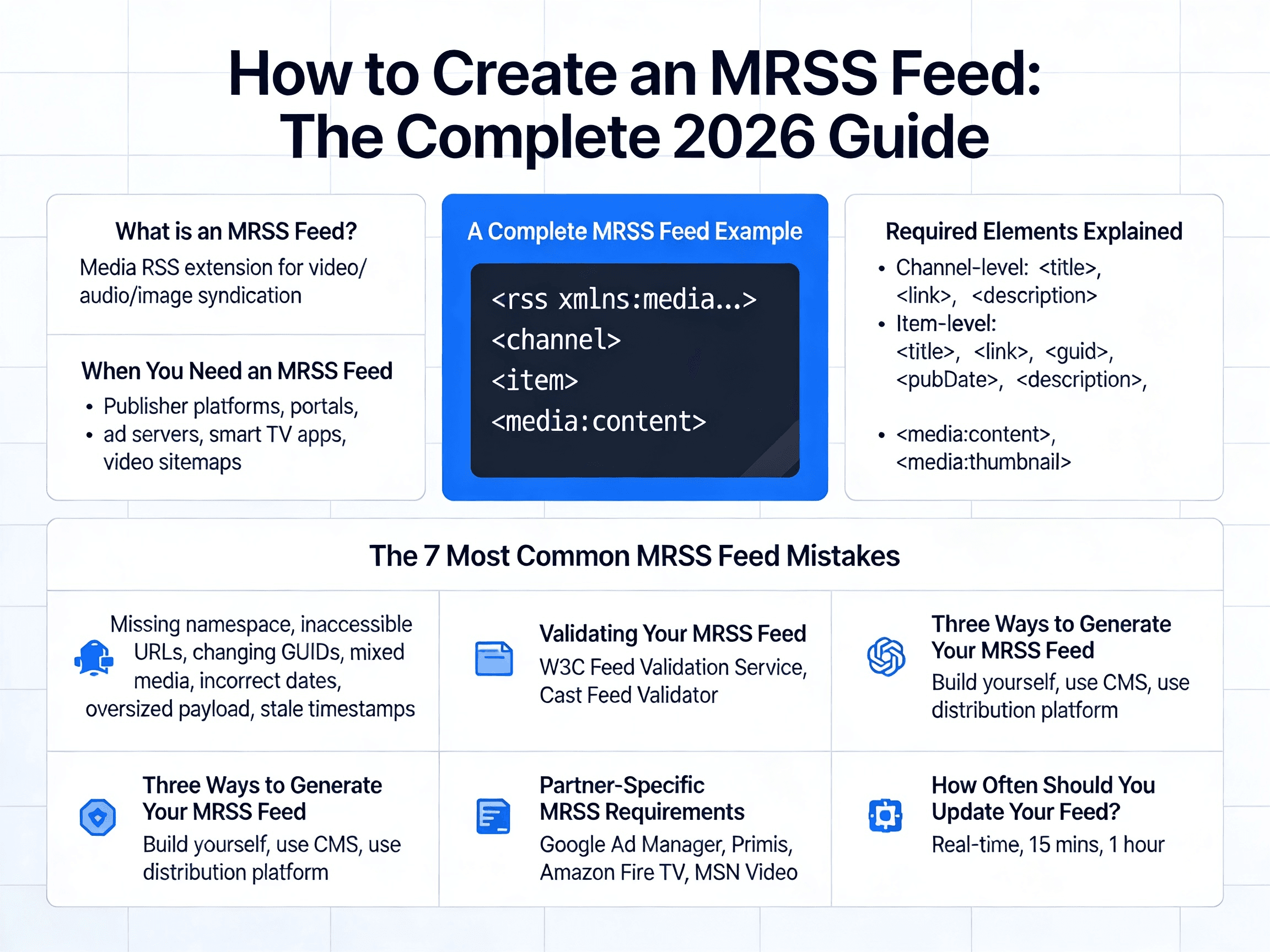
How to Create an MRSS Feed: The Complete 2026 Guide
If you're publishing video at scale, an MRSS feed is the most efficient way to syndicate your content to publishers, OTT platforms, ad servers, and partners — automatically. One feed URL, and your entire video catalog flows to MSN, Yahoo, Amazon Fire TV, Google Ad Manager, Primis, and thousands of other platforms.
This guide walks through exactly how to create an MRSS feed, with a working XML example you can copy, a breakdown of every required element, and the pitfalls that cause most feeds to fail validation.
By the end, you'll have a valid, distribution-ready MRSS feed.
What is an MRSS Feed?
MRSS (Media RSS) is an extension of the standard RSS 2.0 format, originally designed by Yahoo in 2004 to handle video, audio, and image content. While regular RSS feeds carry text articles, MRSS feeds carry rich media — with metadata for thumbnails, durations, categories, and rights information that aggregators need.
MRSS feeds are how the video industry syndicates content. When a publisher integrates a video network (Primis, Ex.co, Vidazoo, Truvid), or distributes to a platform (Yahoo Video, MSN, Amazon Fire), they hand over an MRSS URL. The receiving system polls that URL on a schedule, picks up new items, and ingests them automatically.
The format is XML-based, served over HTTP, and lives at a public URL — for example: https://yoursite.com/feeds/videos.xml.
When You Need an MRSS Feed
You need an MRSS feed if you're:
- Distributing video to publisher platforms (Primis, Ex.co, Anyclip, Vidazoo, Truvid)
- Syndicating content to portals like MSN Video, Yahoo Video, or Amazon Fire TV
- Feeding video into ad servers like Google Ad Manager Dynamic Ad Insertion
- Powering smart TV apps, Roku channels, or connected device experiences
- Submitting video sitemaps to enhance video SEO
If your distribution partner asks for a "feed URL" or "MRSS endpoint," this is what they mean.
A Complete MRSS Feed Example
Here's a working MRSS feed with two video items. This is the template most platforms will accept:
<?xml version="1.0" encoding="UTF-8"?>
<rss xmlns:media="http://search.yahoo.com/mrss/" version="2.0">
<channel>
<title>Acme Video Network</title>
<link>https://acmemedia.com</link>
<description>Premium video content from Acme Media</description>
<language>en-us</language>
<pubDate>Mon, 12 May 2026 14:00:00 +0000</pubDate>
<lastBuildDate>Mon, 12 May 2026 14:00:00 +0000</lastBuildDate>
<item>
<title>Tesla Unveils Next-Gen Battery Tech at 2026 Investor Day</title>
<link>https://acmemedia.com/articles/tesla-battery-2026</link>
<guid isPermaLink="false">acme-vid-00428</guid>
<pubDate>Mon, 12 May 2026 13:30:00 +0000</pubDate>
<description><![CDATA[Tesla announced a new lithium iron phosphate battery design promising 40% more energy density and 25% lower production costs. Here's what it means for EV pricing in 2027.]]></description>
<media:content
url="https://cdn.acmemedia.com/videos/tesla-battery-2026.mp4"
type="video/mp4"
medium="video"
width="1920"
height="1080"
duration="142"
fileSize="48293112"
lang="en"/>
<media:title type="plain">Tesla Unveils Next-Gen Battery Tech at 2026 Investor Day</media:title>
<media:description type="plain">Tesla announced a new lithium iron phosphate battery design promising 40% more energy density and 25% lower production costs.</media:description>
<media:thumbnail url="https://cdn.acmemedia.com/thumbs/tesla-battery-2026.jpg" width="1280" height="720"/>
<media:keywords>tesla, ev, batteries, lithium, automotive</media:keywords>
<media:category scheme="urn:iab">IAB2-2</media:category>
<media:credit role="publisher">Acme Media</media:credit>
</item>
<item>
<title>Why the Fed's Latest Rate Cut Signals Bigger Shifts Ahead</title>
<link>https://acmemedia.com/articles/fed-rate-cut-may-2026</link>
<guid isPermaLink="false">acme-vid-00429</guid>
<pubDate>Mon, 12 May 2026 09:15:00 +0000</pubDate>
<description><![CDATA[An analysis of the Federal Reserve's 25 basis point cut and what it means for mortgages, equities, and consumer spending in Q3 2026.]]></description>
<media:content
url="https://cdn.acmemedia.com/videos/fed-rate-may-2026.mp4"
type="video/mp4"
medium="video"
width="1920"
height="1080"
duration="184"
fileSize="62847291"
lang="en"/>
<media:title type="plain">Why the Fed's Latest Rate Cut Signals Bigger Shifts Ahead</media:title>
<media:thumbnail url="https://cdn.acmemedia.com/thumbs/fed-rate-may-2026.jpg" width="1280" height="720"/>
<media:keywords>federal reserve, interest rates, economy, markets, finance</media:keywords>
<media:category scheme="urn:iab">IAB13</media:category>
<media:credit role="publisher">Acme Media</media:credit>
</item>
</channel>
</rss>
Copy this. Replace the values with your own video metadata. That's the foundation.
Required Elements Explained
Every MRSS feed has two layers: channel-level metadata (information about your feed) and item-level metadata (information about each video).
Channel-Level Elements
Element
Required
Purpose
<title>
Yes
Name of your feed or channel
<link>
Yes
URL of the website associated with the feed
<description>
Yes
One-sentence summary of the feed
<language>
Recommended
ISO language code (e.g., en-us)
<pubDate>
Recommended
When this version of the feed was published
<lastBuildDate>
Recommended
When the feed was last regenerated
Note the namespace declaration in the <rss> opening tag: xmlns:media="http://search.yahoo.com/mrss/". Without this, your feed is just regular RSS — none of the media:* elements will be recognized.
Item-Level Elements
Each <item> represents one video. The critical elements:
<title> — Video title. Keep under 100 characters for compatibility.
<link> — URL of the article or page where the video is embedded. Important for contextual matching by platforms like Primis.
<guid isPermaLink="false"> — A unique, permanent identifier for this video. Use your internal video ID. This must stay the same across feed updates so platforms can track which videos they've already ingested. If you change a GUID, the platform treats it as a brand new video.
<pubDate> — Original publication date in RFC 822 format (Mon, 12 May 2026 13:30:00 +0000).
<description> — Long-form description of the video. Wrap in <![CDATA[...]]> to allow HTML or special characters without breaking the XML.
<media:content> — The most important element. Contains the actual video file URL plus technical specs:
url— Direct, public URL to the video file (MP4 recommended)type— MIME type (typicallyvideo/mp4)medium— Set tovideowidthandheight— Resolution in pixelsduration— Length in secondsfileSize— File size in bytes (optional but recommended)
<media:thumbnail> — Direct URL to a thumbnail image. Best practice: 1280×720 (16:9) for video, JPG or PNG.
<media:keywords> — Comma-separated keywords. Critical for contextual matching algorithms.
<media:category> — Content category. Use IAB Content Taxonomy codes (e.g., IAB17-44 for sports) for ad-tech compatibility.
<media:credit role="publisher"> — Attribution. Some platforms require this for licensing compliance.
The 7 Most Common MRSS Feed Mistakes
These are the issues that break feeds in production:
1. Missing namespace declaration. If you don't add xmlns:media="http://search.yahoo.com/mrss/" to the <rss> tag, every media:* element gets ignored. The feed validates as plain RSS but loses all video metadata.
2. Video URLs that aren't publicly accessible. Aggregators must be able to fetch the video file directly. URLs requiring authentication, signed URLs that expire, or geo-blocked CDN endpoints will fail ingestion. YouTube, Vimeo, and Dropbox URLs are explicitly rejected by most platforms (Amazon Fire App Builder, for example).
3. Changing GUIDs between feed updates. If you regenerate GUIDs each time the feed is built, every video looks new on every poll. The result: duplicate ingestion, broken reporting, and partner trust issues. Use stable internal IDs.
4. Mixed audio and video in one item. Most platforms select only the first <media:content> element per item. If your audio file is listed first, your video gets ignored. Always list video before audio.
5. Incorrect date formats. MRSS uses RFC 822 (Mon, 12 May 2026 13:30:00 +0000), not ISO 8601 (2026-05-12T13:30:00Z). Many feeds break here.
6. Oversized feed payload. Some platforms cap feeds at 10,000 items or specific file sizes. If you have a large catalog, paginate or split into multiple feeds by category.
7. Stale or missing <pubDate> and <lastBuildDate>. Aggregators use these to know if a feed has changed. Without accurate timestamps, your fresh content may not get picked up.
Validating Your MRSS Feed
Never trust a feed in production without validating it first. Two free tools handle this:
- W3C Feed Validation Service (
validator.w3.org/feed) — checks RSS 2.0 compliance and basic MRSS structure - Cast Feed Validator (
castfeedvalidator.com) — specifically built for MRSS feeds with deep validation of media elements
Paste your feed URL, run the check, fix every error and warning. A feed that "looks valid" in the browser will frequently fail at the platform's ingester.
Three Ways to Generate Your MRSS Feed
Option 1: Build It Yourself
If you have engineering resources, generating MRSS from your CMS is straightforward. Most languages have XML libraries that handle the structure (Node's xmlbuilder2, Python's xml.etree.ElementTree, Ruby's Nokogiri::XML::Builder). The work is:
- Query your video catalog
- Map fields to MRSS elements
- Build the XML
- Serve it at a public URL with
Content-Type: application/xml - Cache responses (most feeds don't need to update more than every 5–15 minutes)
Set up cron jobs or webhooks to regenerate when new videos are published.
Option 2: Use Your CMS
WordPress (with plugins), Drupal, and most modern headless CMSes have MRSS extensions or built-in feed generation. Check your CMS docs for "video sitemap" or "media feed" — they're usually the same underlying capability.
Option 3: Use a Platform Built for Distribution
If MRSS is one piece of a larger video distribution strategy — syndication, reporting, monetization, partner management — building and maintaining feeds yourself becomes a tax. Platforms designed for video distribution handle MRSS generation, validation, partner-specific format variations, and reporting in one place.
Middle Block generates MRSS feeds automatically for every video you upload, with partner-specific feed formats for Primis, Ex.co, Anyclip, MSN, Yahoo, and 1,000+ other endpoints. Feeds update in real time, validate before delivery, and include reporting that ties impressions back to each partner.
Partner-Specific MRSS Requirements
Most platforms accept the standard MRSS structure above, but some require additional fields:
- Google Ad Manager (Dynamic Ad Insertion) requires
<dfpvideo:contentId>and<dfpvideo:cuepoints>for ad break markers - Primis strongly recommends
<media:keywords>and<media:category>for contextual matching - Amazon Fire TV requires
<media:thumbnail>at minimum 800×450 (16:9) - MSN Video requires the canonical article URL in
<link>for contextual placement
When integrating with a new partner, ask for their MRSS spec sheet. Most have one.
How Often Should You Update Your Feed?
Most aggregators poll feeds every 5–30 minutes. For your feed:
- Real-time freshness: Regenerate on publish (webhook or CMS hook)
- Reasonable freshness: Regenerate every 15 minutes via cron
- Static catalogs: Regenerate once per hour
Don't regenerate on every request — that's wasteful and can cause partner-side rate limiting. Cache aggressively.
Next Steps
You now have everything needed to create a working MRSS feed:
- Copy the example XML above
- Replace metadata with your video catalog
- Host it at a public URL
- Validate with Cast Feed Validator
- Share the URL with your distribution partners
If you're distributing to multiple platforms and want feeds that handle partner-specific requirements automatically — plus reporting, monetization, and partner management — talk to our team about Middle Block. We power MRSS distribution for 1,000+ publishers worldwide.
— ABOUT THE AUTHOR
Guido Smit
Backend & DevOps
Guido is a unique backend developer with out-of-the-box ideas, emphasizing PHP (Symfony), Python, or Golang.
Connect on LinkedIn— READ NEXT
More from the team.


— LOOKING FOR SOMETHING SPECIFIC?
Talk to our team.
If you have questions about content syndication, partnerships, or the platform — we're here.